

There’s a big trend happening right now. Voice AI is having a moment and many organisations are looking to turn their existing chatbots/AI agents into voice AI agents. Sounds simple.
I’ve been designing voice user interfaces for almost a decade, and I can tell you that voice is a completely different ballgame to chat. Callers behave differently too, which is why every voice AI agent needs a set of global behaviours defined up front.
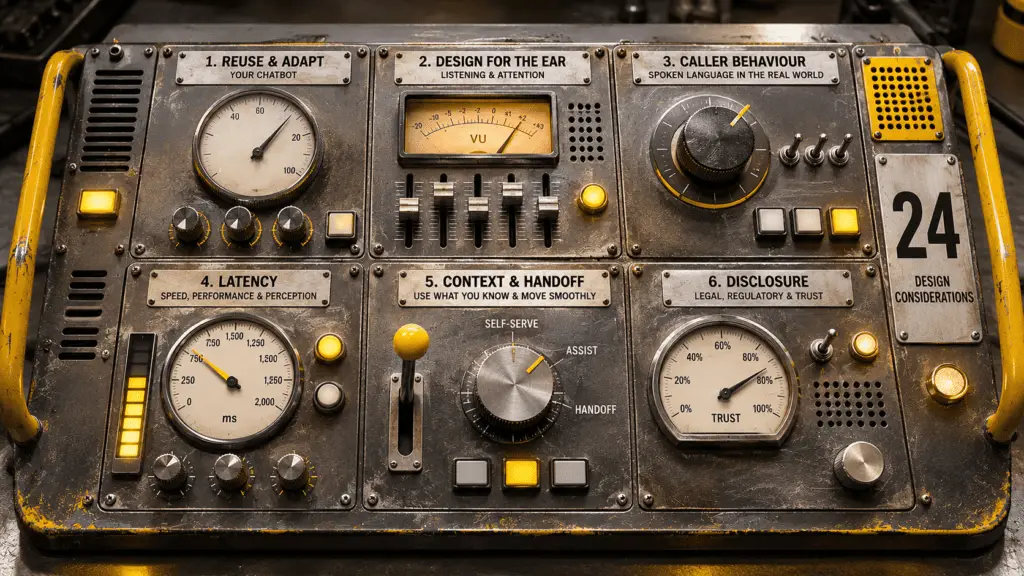
Here are 24 reasons why designing a voice AI agent isn’t as simple as plugging in speech-to-text, text-to-speech or speech-to-speech on top of your chatbots, or choosing a voice.
Teams giving their chatbot a voice soon find that time, attention, latency, messy language and handoff change the whole design job.
Why is voice AI so different to chat?
The main reason designing a voice AI agent is so different from a chat-based AI agent is because it has a completely different interaction paradigm that stems from the two primary constraints of an audio-based interface:
- Time. Voice is an audio interface. Everything happens in linear time, one word after another. You can speed it up or slow it down, but you can’t turn off your ears. You can’t sit with a response for 5 minutes like you can with chat. It’s real time, in the moment. And that presents all kinds of unexpected challenges.
- Attention. You’re always wrestling with the user’s attention span. And that attention can be taken away from you at any moment by things you can’t control. A knock at the door. A barking dog. A child asking for a snack. You simply can’t spew the same content as you do in chat and expect that to work.
Put those two together, a time-constrained audio interface and a user whose attention is always at risk, and you have an interaction paradigm that has very little in common with chat.
I recently spoke to Endre Davids of Seamly on The VUX Podcast about exactly this move from chat to voice (From chatbot to voice AI: what changes?). Between that conversation and our own work, here are the considerations you’ll have to contend with when giving your chatbot a voice.
Be careful about reusing your entire chatbot
1. Assess your knowledge base across chat and voice. Knowledge written for a screen is formatted for a screen, and voice use cases can quickly expose knowledge that’s poorly organised or poorly written.
2. Ambiguity kills voice. Be specific. You can’t get away with an ambiguous answer on the voice channel. In chat, as long as the answer is in there somewhere, you can get away with it. With voice, you’ll be challenged immediately. That means you need to work very hard at being specific.
3. Reuse intent recognition where relevant, but rewrite the answers. “Go to this section, click there” works on a website and falls apart on the phone unless you can establish the user is ready to follow along. Some of your answers in chat won’t be contextually relevant in voice and they’re all probably far too long.
Design for the ear, not the screen
4. One step at a time. A caller can’t scroll back and reread. Give people one thing to do, let them do it, then move on.
5. Expect full attention and distraction at the same time. Endre’s point is that callers are often doing something else while they talk to you, like emptying the dishwasher. Design for people who are listening with half an ear. That means using a lot of confirmations, discourse markers and orientation measures to help users follow along.
6. Don’t read out complex URLs. Send the link by SMS. If you must say a URL, make it short and memorable, preview it and repeat it. Or ask the caller to put you on loudspeaker, open their browser and tell you when they’re ready. In chat, they can be clicked. On voice, they can’t.
7. You have more time on the phone than you think. Callers will give you time as long as the conversation is moving forward. Going around in circles is even more frustrating on the voice channel but users will persevere if it’s going somewhere.
8. Clarify before you answer. In chat you can throw a list of options or a wall of text at someone and let them sift through it to find the answer. In voice you can’t. To avoid ambiguity, you have to overly focus on disambiguation before acting on anything.
“Voice AI is pure conversation design. Chatbot design is lazy conversation design.”
How callers behave differently from chat users
9. People start talking before they know what they want. Spoken language is messier. Callers think out loud, so the request arrives wrapped in a lot of other words.
10. Speaking is easier than typing. Endre points out that people type a short intent in chat. On the phone they tell you the whole story. Your agent has to find the need inside it.
11. Callers often describe situations, rather than needs. “I was on the train going to my mother’s house last Thursday and there was a queue to get off and…” In there somewhere is the ‘I’ve lost my bank card’ intent, but it’s not clear. Voice AI agents need to be able to get to the heart of a problem.
12. Topic jumps, self-corrections and relative dates. Callers change subject mid-sentence, correct themselves and say things like “next Tuesday”. In chat you’d use a date picker. In voice you have no guard rails, so you have to close that gap in the conversation itself.
13. Disambiguate and be certain before you act. The user leads while you don’t yet understand what they mean. As soon as you understand what they need and can deliver it, the assistant takes over and leads. That’s the same in chat. Voice simply needs more disambiguation up front because spoken language is so much more complex.
14. Start open, then take control. The beginning of a voice call is always messy. Users ramble and go here, there and everywhere. You have to let them be in control. However, once you’ve identified their need, the AI agent can take control and get them to a resolution. This is similar to chat with the key difference being that, because of the real-time fluidity of language on the voice channel, this behaviour is much more prevalent.
15. Barge in. In your chatbot, you’re not going to get users responding mid-sentence when you’re in the middle of answering. In voice, its a regular occurrence that needs to be managed from both a conversation/dialogue management perspective, but also from a policy perspective i.e. when do you enable it vs disable it?
Dealing with latency
16. Half a second is noticeable. Endre says a delay of half a second is already really noticeable on a call, and that anything over about 1.5 seconds is pretty unacceptable, though expectations vary by culture. Always aim for low latency. A multi-second generative AI answer is far too long on voice, but it’s OK on chat.
17. Choose where you accept latency. At the end of a journey, once you have everything you need to, for example, make an API call, then some latency is OK. A three second pause after every single turn get very annoying very quickly.
18. Use faster models, or no AI, for data collection. Not every step needs a large language model. Data collection steps can run on something much quicker, as can business rules and logic.
19. Treat latency like hallucination. You’ll never fully get rid of it, so it becomes about managing it where it’s inevitable.
20. Mask latency. Where you have latency, you can mask it with dialogue, earcons, folly or, dare I say, music (the last one is ill-advised, but technically possible!). For example “Give me a second while I look that up”, might take 1 second to say. That buys you an extra second to make your API call.
21. Measure perceived latency against system latency, per component, per turn. What the caller experiences can differ from what the system logs. Measure speech-to-text, text-to-speech, telephony and the bot separately, then fix the biggest culprit first. Swapping a speech-to-text model might save 0.1 or 0.2 seconds. Endre has seen the chatbot’s own answer generation add 15 seconds. We covered perceived latency in depth in What does it take to make a voice AI agent reliable?
Use context and hand off cleanly
22. Don’t open with “Hi, how can I help?” when you already know things. The caller is calling from a phone number. You might know who they are and where they are in a journey. Recognise them and use it.
23. Don’t use voice AI to keep callers away from your agents. Make the voice assistant a valuable part of the conversation and make sure callers can still reach a colleague when they need one.
Disclosure under time pressure
24. Meet your legal requirements, fast. You still have obligations under regulation such as the EU AI Act. In chat, you can put three paragraphs of legal basis at the start of the conversation. Nobody reads it, but you’re covered. In voice, everything is about wrestling with time. You have to get disclosure out of the way as quickly as possible and get on with the conversation, which makes for some challenging conversations with legal teams!
Giving your chatbot a voice is a design job
Moving from chat to voice takes a lot more than giving your chatbot a voice. Time and attention change everything, from how you write answers to how you handle latency, handoff and disclosure.
The headlines around speech-to-speech models like Dessa, GPT-Live-1 and the like, make voice AI sound simple. And, while those models certainly improve conversation fluency and handle things like backchannelling and barge-in more effectively, they’re still relying on the underlying language models for conversation management and fulfilment. And that’s where the work is.
Over the next few weeks we’ll be publishing our design principles and design standards for creating successful voice AI conversations. We may also publish our methodology, the process we follow on every project.
Voice AI design has been our specialism since 2018. If you’re moving from chat to voice now and need help putting all of these considerations into practice, that’s exactly what we help with at VUX Consulting.